User/admin guide to RMR cluster management
Warning
RMR and BRMR are under active development and are not ready for production use. The codebase contains known bugs, incomplete features, and areas that require improvement, correction, or refactoring — expect instability and potential data loss. APIs and interfaces may change without notice.
Overview
RMR (Reliable Multicast over RTRS) is a storage replication technology that provides replication of volumes between servers (or clusters) to maintain redundancy in the event of failure at a data storage location. It guarantees reads and writes of a block of data within a storage cluster with a given replication factor, using reliable direct memory access as a transport mechanism.
Two roles are involved in an RMR cluster:
compute client: the host that issues block IOs. It runs the
rmr-clientandbrmr-clientmodules. The compute client maps the brmr block device and sends reads and writes to the storage nodes.storage node: the host that stores data on disk. It runs the
rmr-serverandbrmr-servermodules, and alsormr-clientfor internal peer-to-peer sync between storage nodes.
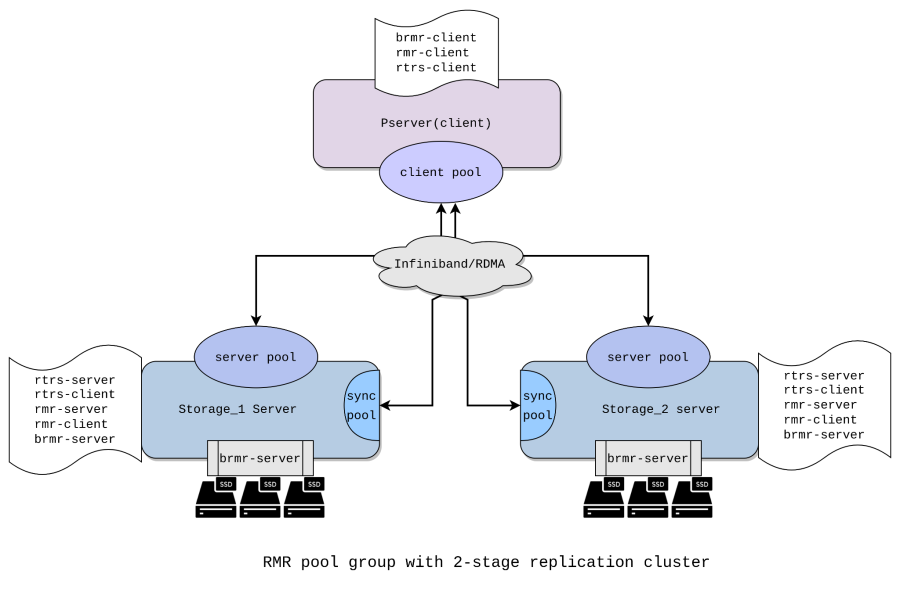
This guide walks through a two-node setup (replication factor 2): two storage nodes and one compute client. Steps for larger clusters follow the same pattern — repeat the per-storage-node steps for each additional node.
Prerequisites
RDMA-capable NICs and an RDMA fabric (RoCE or InfiniBand) connecting all nodes.
RMR kernel modules built from source and available for
modprobeon all nodes.
An administrator of the RMR pool group storage cluster will need the following major use cases for configuring and maintaining a storage cluster:
Configure a machine to be a storage node: specify which disks are to be used for replication.
Configure the compute client cluster with an RMR pool group.
Add a configured storage node to the existing cluster.
Remove a given storage node from the cluster.
Replace a hard drive on a storage node.
Configure RMR pool on storage and client
Below are steps to create a storage cluster with a replication factor of 2. This will contain two storage servers (storage_1 and storage_2) and one compute client.
Load kernel modules
Load the prerequisite modules for RMR and RTRS on the corresponding client and storage servers.
On the compute client
modprobe rtrs-client
modprobe rmr-client
modprobe brmr-client
On all storage servers
modprobe rtrs-server
modprobe rtrs-client
modprobe rmr-server
modprobe rmr-client
modprobe brmr-server
Create RMR pool on compute client and storage servers
On the compute client
echo 'poolname=ionos_pool chunk_size=131072' > /sys/class/rmr-client/ctl/join_pool
On storage 1
echo 'poolname=ionos_pool member_id=42' > /sys/class/rmr-server/ctl/join_pool
On storage 2
echo 'poolname=ionos_pool member_id=43' > /sys/class/rmr-server/ctl/join_pool
poolname — the name of the pool; must be ASCII. When creating a pool, this must be the same on the compute client and all storage nodes.
member_id — unique integer ID for a storage node; used to uniquely identify a particular storage node in a pool.
Create (BRMR) Store
Before any sessions can join, a backend store must be registered on each storage server. The server pool starts in EMPTY state and rejects all session joins until a store is registered.
BRMR server
The BRMR server module is already loaded on a storage node. It sits below the rmr-srv module, registers block devices with rmr server pools, and services IOs.
The io_store is the structure holding the backend disk information for the RMR server pool. It has pointers to the store operations for a particular backend. It is only populated and hence usable for RMR server pools that have a registered backend.
If the disk contains metadata that the RMR store recognizes, the create_store command fails. In that case, use add_store instead. The add_store functionality is described later in the Replace BRMR block device on an active pool group section.
Create store on storage 1
echo 'device=/dev/sda pool=ionos_pool mapped_size=204800' > /sys/class/brmr-server/ctl/create_store
mapped_size — the number of sectors on the disk to assign to the brmr store device.
In this example: 512 bytes/sector × 204800 sectors = 104,857,600 bytes (100 MB).
Create store on storage 2
echo 'device=/dev/sda pool=ionos_pool mapped_size=204800' > /sys/class/brmr-server/ctl/create_store
Create and enable sessions on the client
Each session is connected to each node on which replication is taking place.
On the compute client, create a session for each storage server and enable them. The session name (e.g. psrv0@stg-rmr0) must be unique per storage server.
Note that within a pool group you can create only one client session per storage node.
The mode=create parameter tells the storage server that this is a fresh pool being created for the first time.
echo 'sessname=psrv0@stg-rmr0 path=ip:192.168.122.80 mode=create' > /sys/class/rmr-client/pools/ionos_pool/add_sess
echo 1 > /sys/class/rmr-client/pools/ionos_pool/sessions/psrv0@stg-rmr0/enable

echo 'sessname=psrv0@stg-rmr1 path=ip:192.168.122.84 mode=create' > /sys/class/rmr-client/pools/ionos_pool/add_sess
echo 1 > /sys/class/rmr-client/pools/ionos_pool/sessions/psrv0@stg-rmr1/enable
path — IP address of the connecting storage server. (Note: at this stage, username, password, portnum, and IPv6 addressing are not supported.)
sessname — user-assigned name for an rmr_clt_pool_sess. It can be any string. The in-house naming convention is <clt_hostname@server_hostname>.
mode — determines how the session joins the server pool.
create: used when creating a new pool for the first time. The storage server must have been freshly formatted withcreate_store.assemble: used when an existing pool is being reassembled after the compute client was replaced or crashed. The storage retains its data and map, and waits for a pool enable before serving IOs again.
Create sync pool
A client pool created on the storage nodes is used by the RMR server pool for internal data sync between storage nodes.
On storage 1
echo 'poolname=ionos_pool chunk_size=131072 sync=y' > /sys/class/rmr-client/ctl/join_pool
A client pool can act either as a sync pool on storage nodes or as a non-sync pool on compute clients that serves IOs to BRMR. The user must specify which mode applies.
sync=y (boolean) distinguishes a sync pool (sync=y, on storage) from an IO pool (no sync, default, on compute client).
chunk_size — size of the data block used for storage read/write. chunk_size is configurable during pool creation and cannot be changed afterwards.
echo 'sessname=stg-rmr0@stg-rmr1 path=ip:192.168.122.84' > /sys/class/rmr-client/pools/ionos_pool/add_sess

echo 'ionos_pool' > /sys/class/rmr-server/pools/ionos_pool/add_clt
Similar to storage_1, create a new sync pool on storage_2 server.
echo 'poolname=ionos_pool chunk_size=131072 sync=y' > /sys/class/rmr-client/ctl/join_pool

echo 'sessname=stg-rmr1@stg-rmr0 path=ip:192.168.122.80' > /sys/class/rmr-client/pools/ionos_pool/add_sess

echo 'ionos_pool' > /sys/class/rmr-server/pools/ionos_pool/add_clt
Initial sync
When a new pool is created with more than one storage leg, the first enabled leg is authoritative. All subsequent legs join in a dirty state — their data is not yet consistent with the first leg and must be synced before the pool can be considered fully healthy.
RMR does not currently start sync automatically. The sync thread must be started manually on each storage node that joined after the first. In the future, the sync thread will start automatically when a storage node transitions to NORMAL state with dirty chunks. On each such node, run:
echo "start" > /sys/class/rmr-server/pools/<pool_name>/sync
Monitor progress by checking the dirty map:
cat /sys/class/rmr-server/pools/<pool_name>/map_summary
The pool can serve IOs while sync is running. Dirty chunks are synced on demand as IOs hit them, and the sync thread works through the remaining dirty chunks in the background. However, for a fully consistent state before production use, wait for the sync thread to complete.
Map the BRMR block device on the client
The BRMR client module is loaded on the compute client. It uses the rmr-clt module as its transport layer to send and receive IOs, and maps and unmaps the brmr block device.
echo 'pool=ionos_pool size=204800' > /sys/class/brmr-client/ctl/map_device
Verify that brmr block device is visible on the client
lsblk
NAME MAJ:MIN RM SIZE RO TYPE MOUNTPOINT
brmr0 251:0 0 100M 0 disk
nullb0 252:0 0 250G 0 disk
Nullb1 252:1 0 250G 0 disk
nullb2 252:2 0 250G 0 disk
nullb3 252:3 0 250G 0 disk
nullb4 252:4 0 250G 0 disk
vda 254:0 0 4G 0 disk
`-vda1 254:1 0 2.1G 0 part /
You can now run read/write IO on the brmr0 device from the client.
Random write IO with bs 4K:
fio --filename=/dev/brmr0 --direct=1 --rw=randwrite --bs=4k --ioengine=libaio --iodepth=32 --runtime=120 --numjobs=4 --size=25M --verify=md5 --verify_fatal=1 --loops=20 --time_based --group_reporting --name=iops-test-job --eta-newline=1
Random read IO with bs 4K:
fio --filename=/dev/brmr0 --direct=1 --rw=randread --bs=4k --ioengine=libaio --iodepth=32 --runtime=120 --numjobs=4 --size=25M --verify=md5 --verify_fatal=1 --loops=20 --time_based --group_reporting --name=iops-test-job --eta-newline=1
Check health status and debug
You can check the pool statistics and additional health status through sysfs attributes.
Pool state
The server pool has the following states:
empty: Pool has been created but no backend store has been registered yet. No session joins are allowed in this state.
registered: A backend store has been registered, but no sessions have joined yet. The pool is ready to accept session joins.
created: A create-mode session has joined. Pool has sessions but IO is not yet enabled.
normal: Pool can accept read and write requests. There is at least one session in normal state and the map is up to date.
no_io: Pool cannot accept IO. This occurs after a failure (network or IO error), after manual maintenance mode, or while assembling an existing pool. The pool waits for a pool_enable from the compute client before transitioning to normal.
The deletion of the pool is conditional and must follow a specific sequence:
An RMR client pool cannot be deleted if it has sessions. The sessions must be deleted before the pool can be deleted.
An RMR server pool cannot be deleted if it has a backend store registered.
Follow the graceful exit from the pool_group section of the document for the correct sequence of RMR pool deletion.
Read the server pool state
cat /sys/class/rmr-server/pools/ionos_pool/state
normal
RMR client session state
RMR client session states are critical to the correct operation of RMR. The session states govern the execution of several things:
Map update for non-sync sessions while transitioning from RECONNECTING to NORMAL state. If this transition occurs without a map update, it can lead to data corruption.
Piggybacking a map add for a failed session during an IO. If missed, this can eventually lead to data corruption.
If the transition to FAILED state does not occur after an IO failure or link event, a delay can occur for each subsequent IO.
Read the client session state on compute client
cat /sys/class/rmr-client/pools/ionos_pool/sessions/psrv0@stg-rmr0/state
normal
Created: When a user creates a new session. Normal: When the user enables the session and after a successful pool enable. Failed: When the RTRS link disconnects or an IO error occurs. The user can also disable the session manually. Reconnecting: When the RTRS link is restored successfully, after a successful store check message, or after a successful manual reconnect.
You can also read the client session state for the sync pool on a storage server:
cat /sys/class/rmr-client/pools/ionos_pool/sessions/stg-rmr0@stg-rmr1/state
normal
Read the member_id for each client session:
cat /sys/class/rmr-client/pools/ionos_pool/sessions/psrv0@stg-rmr1/member_id
42
Similarly, read the member_id on the server pool:
cat /sys/class/rmr-server/pools/ionos_pool/member_id
43
BRMR device and brmr-store statistics
Check the brmr device status on the compute client:
cat /sys/class/brmr-client/ctl/devices/brmr0/state
ready

cat /sys/class/brmr-client/ctl/devices/brmr0/block/size
204800
Check the brmr-store status on a storage server node. Read the store state and mapped pool size:
cat /sys/class/brmr-server/stores/ionos_pool/state
open
mapped

cat /sys/class/brmr-server/stores/ionos_pool/mapped_size
204800
Open — After a successful store add. The block device is in use by the module. Mapped — The device is mapped by brmr-clt and can service IOs.
Read the brmr_store connected block device and device size (dev_size should equal the size of the disk):
cat /sys/class/brmr-server/stores/ionos_pool/bdev_name
sda

cat /sys/class/brmr-server/stores/ionos_pool/dev_size
409600
Dirty map status
When a write IO fails on one of the storage nodes, the affected data chunk is marked dirty. The RMR server pool tracks chunks that are dirty (and need syncing) in a map. When an IO hits a dirty chunk, the entire chunk is locked and synced from another storage node. Once done, all waiting IOs are resumed.
To get the summary of the dirty map, run:
cat /sys/class/rmr-server/pools/ionos_pool/map_summary
member 43: [12 28 80 87 93 95 116 125 142 340 388 402 431 435 436 437 453 457 486 523 531 536 554 661 694 745 746 750 753 755] 30/800 dirty
member 42: [] 0/800 dirty
To print the entire map, one can use the following sysfs. But for a large device, this would flood the kernel log, so care should be exercised.
cat /sys/class/rmr-server/pools/ionos_pool/map
Recovery
All failure scenarios — network link failure, storage node crash, and compute client crash — share the same final steps once the affected node is back online: session reconnect followed by a pool enable. Those steps are described once in Common recovery steps below and referenced by each specific scenario.
Common recovery steps
Session reconnect
Once the underlying link is restored, the RTRS layer reconnects automatically and the client session transitions to reconnecting. Verify:
cat /sys/class/rmr-client/pools/ionos_pool/sessions/<session-name>/state
reconnecting
If the session does not reconnect automatically, trigger it manually:
echo 'path=ip:<storage-ip>' > /sys/class/rmr-client/pools/ionos_pool/sessions/<session-name>/reconnect
Pool enable
After reconnect, the client automatically distributes the dirty map to the recovering node and re-enables it. IOs are frozen briefly while the map is transferred.
If the auto pool enable does not trigger, run it manually:
echo 1 > /sys/class/rmr-client/pools/ionos_pool/pool_enable
Verify recovery
On the client:
cat /sys/class/rmr-client/pools/ionos_pool/sessions/<session-name>/state
normal
On the storage node:
cat /sys/class/rmr-server/pools/ionos_pool/state
normal
Network link failure
When the network link to a storage node drops, the client session transitions to failed:
cat /sys/class/rmr-client/pools/ionos_pool/sessions/psrv0@stg-rmr1/state
failed
In the kernel dmesg log you can see the RTRS link disconnected message:
[15363.822891] rmr_client L715:Rtrs link ev disconnected: session psrv0@stg-rmr1
[15363.823407] rmr_client L704:set sess psrv0@stg-rmr1 to failed due to link_ev
Once the link is restored, verify the server IP is reachable. The RTRS layer reconnects automatically:
[15425.437780] rmr_client L721:Rtrs link ev reconnected: session psrv0@stg-rmr1
On the storage node, the pool will be in no_io state until recovery completes:
cat /sys/class/rmr-server/pools/ionos_pool/state
no_io
Follow Common recovery steps to complete the reconnect and pool enable.
Recover after storage node crash
When the pool group is active, any node — client or storage server — may encounter a system error leading to an abrupt crash. The RMR pool group supports smooth recovery of the failed node.
If the storage node crashes, it can be re-added to the pool group after it is restored. From the client side, only a disconnect is visible. If the storage server goes unresponsive or crashes while serving IOs, all IOs to that node fail and dirty chunks for the failed blocks are added to the dirty map.
Read the dirty chunks on the other active storage server by checking the kernel log:
cat /sys/class/rmr-server/pools/ionos_pool/map
Once the failed storage node is restored, load all prerequisite modules for the RMR server pool. On the recovered storage server, create the server pool with the same name and attributes:
echo 'poolname=ionos_pool member_id=43' > /sys/class/rmr-server/ctl/join_pool
Add a store using the previously connected disk (which still has its metadata):
echo 'device=/dev/sda pool=ionos_pool mapped_size=204800 mode=add' > /sys/class/brmr-server/ctl/add_store
Create the sync pool session with the same attributes:
echo 'poolname=ionos_pool chunk_size=131072 sync=y' > /sys/class/rmr-client/ctl/join_pool
echo 'sessname=stg-rmr1@stg-rmr0 path=ip:192.168.122.80' > /sys/class/rmr-client/pools/ionos_pool/add_sess
echo 'ionos_pool' > /sys/class/rmr-server/pools/ionos_pool/add_clt
The RMR client still holds a reference to the previously existing session and will auto-reconnect once the storage node is back online. Follow Common recovery steps to complete reconnect and pool enable.
Recover after compute client crash
If the compute client crashes while the pool group is still active, it can be re-added to the pool group after it is restored. When this happens, verify that all storage servers are active and healthy. The server pool state will be no_io:
cat /sys/class/rmr-server/pools/ionos_pool/state
no_io
Once the compute client is restored, load all prerequisite modules for the RMR client pool. Then configure the compute client by creating a pool with the same name and creating client sessions to all storage nodes already active in the pool.
Use mode=assemble since the storage nodes already hold data for this pool and must wait for a pool enable before serving IOs.
echo 'poolname=ionos_pool chunk_size=131072' > /sys/class/rmr-client/ctl/join_pool

echo 'sessname=psrv0@stg-rmr0 path=ip:192.168.122.80 mode=assemble' > /sys/class/rmr-client/pools/ionos_pool/add_sess

echo 'sessname=psrv0@stg-rmr1 path=ip:192.168.122.84 mode=assemble' > /sys/class/rmr-client/pools/ionos_pool/add_sess
After all legs are successfully assembled, RMR client auto-triggers pool enable. If the auto trigger fails, see Common recovery steps — Pool enable.
Once the pool is back to normal, map the brmr device on the compute client:
echo 'pool=ionos_pool size=204800' > /sys/class/brmr-client/ctl/map_device
Now the block device is mapped and ready for IOs.
Replace BRMR block device on an active pool group
Note: This feature is currently disabled.
The add_store command handles block device replacement for both disks with existing metadata and disks without metadata (new disks). Disk metadata is written by create_store when the pool is first created. An add_store command for a disk without metadata is treated internally as a replace: the brmr-server detects the missing metadata, creates the store, and registers the disk with the RMR server.
Step 1: Remove the existing disk using remove_store:
echo 1 > /sys/class/brmr-server/stores/ionos_pool/remove_store
This removes the disk and the corresponding brmr-srv IO store, and calls the RMR server unregister. IOs for this leg will fail until a new disk is added.
Step 2: Add the new empty disk. (If it contains old metadata, clear it first.)
echo 'device=/dev/sda_new pool=ionos_pool mapped_size=204800 mode=replace' > /sys/class/brmr-server/ctl/add_store
The pool_name and mapped_size must match those used in the original create_store call; otherwise the add will fail.
Once this succeeds, trigger the sync thread to sync the entire disk:
echo 'start' > /sys/class/rmr-server/pools/ionos_pool/sync
Note: You can skip the explicit sync and let chunks be synced on demand as IOs from the compute client hit them.
If a disk is removed with a graceful shutdown, its store is “removed” but metadata is retained on disk. When the same pool is recreated, that disk can be re-added via add_store. The brmr-server detects the existing metadata and simply creates the store and registers the disk with the RMR server.
Graceful exit from the RMR pool group
At any given point you can remove any (faulty or working) storage node, remove and add a compute client, or dissolve the entire pool group smoothly through sysfs entry.
There are two modes for removing a storage leg from a pool:
Disassemble: Gracefully detaches a storage node from the pool. The backend disk retains its pool metadata and can be re-attached later using
add_store mode=add. Use this for temporary removal, maintenance, or when the pool is being shut down but may be restarted later.Delete: Permanently removes a storage node from the pool. The backend disk metadata is wiped by
delete_store. The disk must be reformatted withcreate_storebefore it can be used in a pool again. Use this when the node is being decommissioned permanently.
Disassemble a pool (graceful shutdown, data preserved)
This procedure detaches all storage legs without deleting pool metadata. The pool can be reassembled later.
Step 1: Unmap the BRMR device on compute client
echo 1 > /sys/class/brmr-client/ctl/devices/brmr0/unmap_device
Step 2: Remove the sync sessions on the storage servers
echo 'mode=disassemble' > /sys/class/rmr-client/pools/ionos_pool/sessions/stg-rmr0@stg-rmr1/del_sess
echo 'mode=disassemble' > /sys/class/rmr-client/pools/ionos_pool/sessions/stg-rmr1@stg-rmr0/del_sess
Step 3: Remove the client sessions from the compute client using disassemble mode
echo 'mode=disassemble' > /sys/class/rmr-client/pools/ionos_pool/sessions/psrv0@stg-rmr0/del_sess
echo 'mode=disassemble' > /sys/class/rmr-client/pools/ionos_pool/sessions/psrv0@stg-rmr1/del_sess
Step 4: Remove the stores on both storage nodes
remove_store detaches the backend disk without wiping metadata.
echo 1 > /sys/class/brmr-server/stores/ionos_pool/remove_store
Step 5: Leave the pool on all nodes
On compute client:
echo 1 > /sys/class/rmr-client/pools/ionos_pool/leave_pool
On Storage 1 and 2:
echo 1 > /sys/class/rmr-server/pools/ionos_pool/leave_pool
echo 1 > /sys/class/rmr-client/pools/ionos_pool/leave_pool
Delete a leg and eventually the full pool (permanent removal)
This procedure permanently removes one or more storage legs. Pool metadata on the disk is wiped. To delete the full pool, repeat for each leg.
Step 1: Unmap the BRMR device
Unmap the brmr device on client. On compute client:
echo 1 > /sys/class/brmr-client/ctl/devices/brmr0/unmap_device
Step 2: Remove the sync session from the leg being deleted (on that storage node)
echo 'mode=disassemble' > /sys/class/rmr-client/pools/ionos_pool/sessions/stg-rmr1@stg-rmr0/del_sess
The sync session on the peer storage pointing toward the deleted leg must also be removed:
echo 'mode=disassemble' > /sys/class/rmr-client/pools/ionos_pool/sessions/stg-rmr0@stg-rmr1/del_sess
Step 3: Remove the client session from the compute client using delete mode
mode=delete tells the storage server to expect a delete_store call that will wipe the disk metadata.
echo 'mode=delete' > /sys/class/rmr-client/pools/ionos_pool/sessions/psrv0@stg-rmr1/del_sess
Step 4: Delete the store on the storage node
delete_store permanently removes pool metadata from the disk. The disk must be reformatted before it can be used again in any pool.
echo 1 > /sys/class/brmr-server/stores/ionos_pool/delete_store
Step 5: Leave the pool on the removed storage node
echo 1 > /sys/class/rmr-server/pools/ionos_pool/leave_pool
echo 1 > /sys/class/rmr-client/pools/ionos_pool/leave_pool
Repeat steps 2-5 for each remaining storage leg to fully dissolve the pool.
Step 6: Remove the pool on the client
echo 1 > /sys/class/rmr-client/pools/ionos_pool/leave_pool